How to set up Amazon Attribution links for Facebook ads
Most authors running Facebook ads have no idea which ad is selling books.
They can see clicks. They can see likes and comments. None of that tells you whether anyone bought anything. An ad can pull cheap clicks all day and sell nothing, and without tracking you will keep funding it.
Amazon Attribution fixes that. It is free, it takes about twenty minutes to set up the first time, and by the end of this guide you will have a separate tracking link for every image you are testing, wired into your Facebook ads, so you can see exactly which one turns clicks into sales.
Fair warning up front. Amazon's interface for this is clunky, it does one thing that will quietly ruin your data if you are not watching for it, and I will show you exactly where that trap is.
What an Amazon Attribution link actually is
An Attribution link is a normal Amazon product link with a tracking code stuck on the end, so Amazon can tell you what happened after someone clicked it.
That is the whole idea. You start with a clean link to your book:
https://www.amazon.com/dp/YOURASINYou run it through Amazon Attribution and you get back the same link with a long string of tracking code attached. I call it junk, but that junk is what does the work. Every image you test gets its own version of that code, so Amazon can report back separately on each one.
What you get back is clicks, purchases, units sold, and Kindle+ (formerly Kindle Unlimited) page reads, split out per image.
This came available to self publishers in late 2022. Before that, if you wanted to know which of three images was actually converting, you had to run one, turn the others off, wait, then swap. It worked, but it was painfully slow. Those days are gone.
One note on why this matters more in fiction than in most other markets. Our readers browse. They open three tabs, read the sample, check reviews, and come back days later. A click that does not turn into a sale today might turn into one next week. Attribution catches that. Facebook's own reporting cannot, because Facebook has no visibility into what happens on Amazon.
What you need before you start
Not much.
You need a published book. That is genuinely it.
You do not need to be running Amazon ads. You do not need an active campaign. You do not need to spend anything. Attribution is a free measurement tool and you can reach it whether or not you have ever run a single Amazon ad.
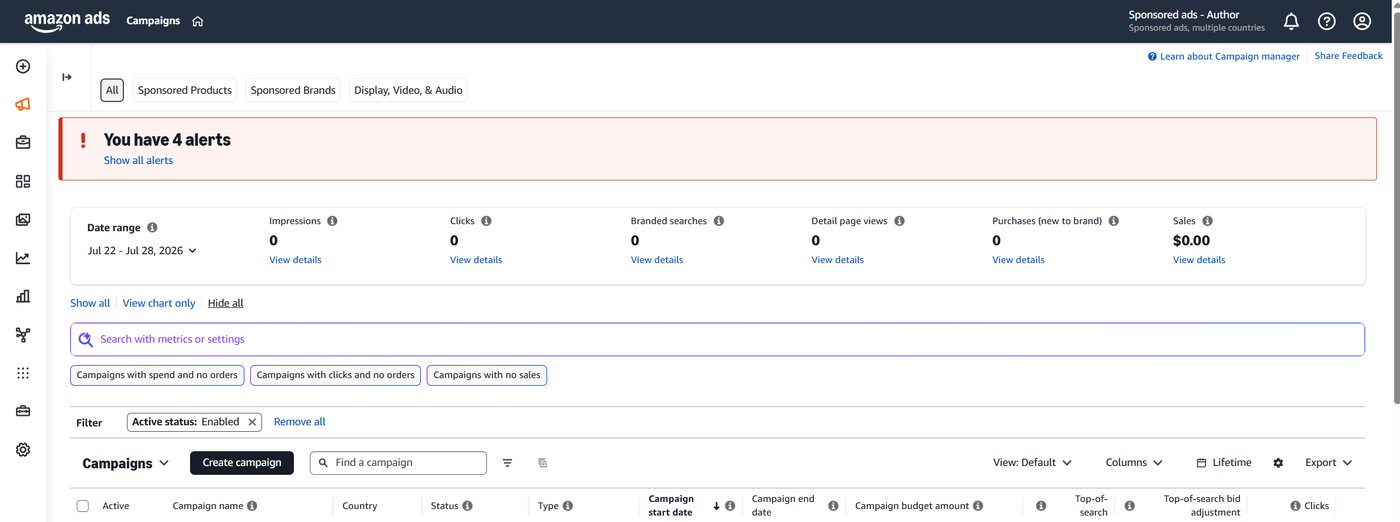
You reach it through the Amazon Ads dashboard. Two ways in:
- Go to
advertising.amazon.comand log in with your KDP account. - Or start in KDP, go to Marketing, select Amazon.com, and click through to the ads console.
Both land you in the same place. Bookmark whichever you prefer.
One limitation to know now rather than later. If you are advertising into the UK, Canada, or Germany, you have to go to that country's Amazon ads console and set the links up separately there. It is a pain. For most of us the majority of sales come through the US anyway, so start there and only build out the other countries if you are genuinely spending money into them.
Decide your naming system before you click anything
This is the step people skip, and it is the step that decides whether your data is usable in three weeks.
You are going to create a separate Attribution link for every image you test. Then you are going to paste each of those links into a matching Facebook ad. If the names do not line up across both platforms, you will end up looking at a number and not knowing which image produced it.
So pick a naming pattern now and use it identically on both sides.
Mine is simple:
image 1 copy 1 image 2 copy 1 image 3 copy 1Image refers to the creative. Copy refers to the ad copy. If you are testing three images against the same copy, you get image 1 copy 1, image 2 copy 1, image 3 copy 1. If you later test a second version of the copy, you get image 1 copy 2, and so on.
Use the exact same names in Amazon Attribution and in Facebook Ads Manager. Not similar names. The same names.
How many images should you test
Start with three to five, and make them dramatically different from each other. Not three variations of the same cover mockup with the text moved around. Different concepts.
More is better in principle, because you learn more. The tradeoff is time. Facebook will decide early on that one of your images deserves most of the impressions, and it will starve the others. So the more images you run, the longer it takes to get enough data on each one to make a real decision.
Three to five is the balance I have landed on after doing this across a lot of ad accounts.
Use 1080 by 1080 images. Square works across placements. If you upload something heavily landscape, Facebook will throw an error on the vertical placements and you will waste time fixing it.
A confusing thing about the words "ad group"
Worth clearing up before you start, because the same phrase means two different things on the two platforms you are about to use.
On Amazon Attribution, the structure is campaign, then ad groups. An ad group here is not a container for anything. It is just a label, and each one produces exactly one tracking link. Three images means three ad groups means three links.
On Facebook, the structure is campaign, then ad set, then ads. Here an ad set really is a container. It holds your targeting, your budget, your placements, and inside it sit your individual ads, one per image.
So the mapping goes like this. One Amazon Attribution ad group corresponds to one Facebook ad. Not to a Facebook ad set. The link generated by the Amazon ad group named image 1 copy 1 goes into the website URL field of the Facebook ad named image 1 copy 1.
If that clicks for you, the rest of this guide is mechanical.
Step 1: Open Amazon Attribution
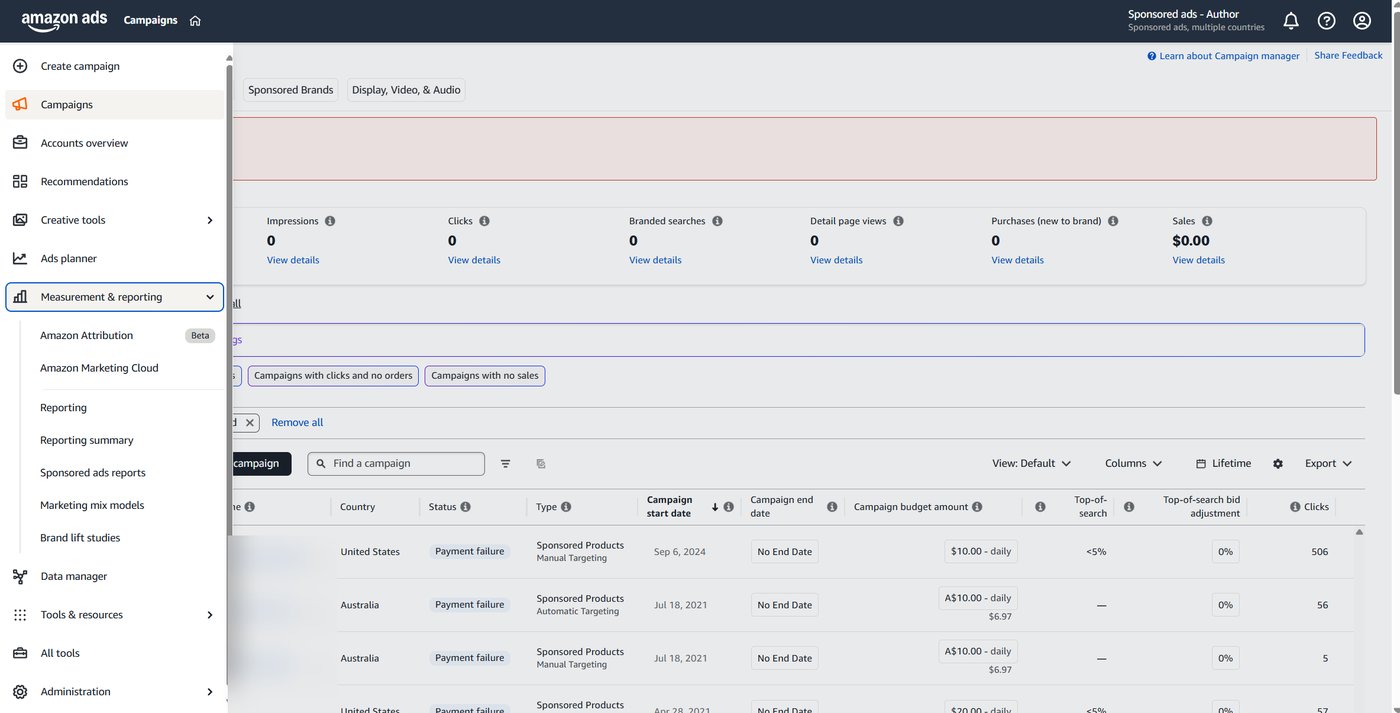
In the Amazon Ads console, look at the left navigation and find Measurement and Reporting. Click it, then click Amazon Attribution.
You will see it is still labelled beta. It has been in beta for years now. Will it ever come out of beta? Maybe, eventually. It works fine regardless.
If this is your first time, the campaign list will be empty. That is expected.
Step 2: Create a campaign
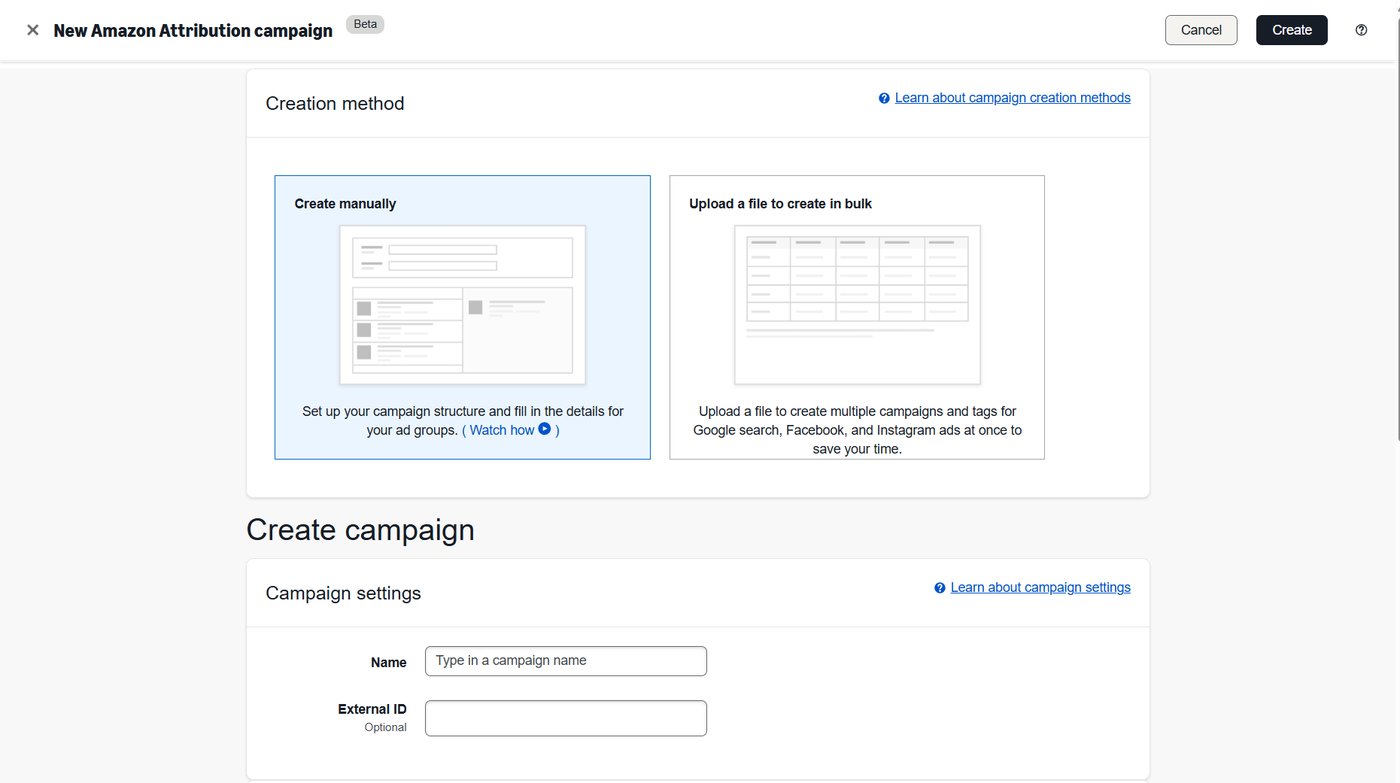
Click Create campaign, then choose Create manually.
There is a bulk upload option via spreadsheet. For three to five links you do not need it, and the manual route is easier to check.
Naming the campaign
Give the campaign a name that tells you two things: which book, and what kind of targeting.
I use an abbreviation of the book title, then the targeting approach. Something like:
SOTG - Facebook - open targetingOr if you are targeting readers of a specific author:
SOTG - Facebook - SandersonThe point is that in three months you can look at the campaign name and immediately know what it was for. Whatever makes sense to you is fine, as long as it makes sense to you later.
Run one campaign per book, per targeting approach. If you are also running BookBub ads or Instagram ads and you want those separated out, give them their own campaigns too. It makes no difference to performance. It only affects how easily you can read the results, which is the entire reason you are doing this.
The external ID field
Ignore it. You do not need to fill it in.
Selecting your books
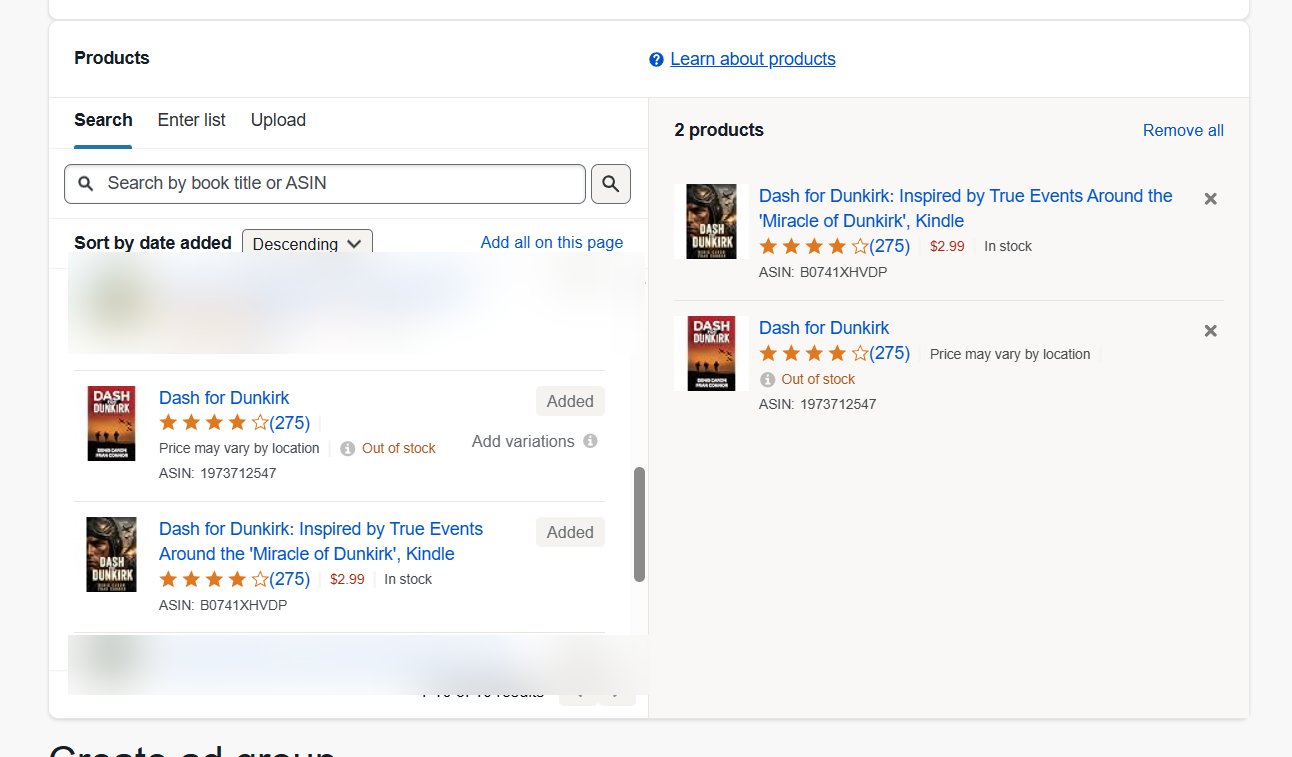
Next you pick which products this campaign is measuring.
Select every format of your book that is listed. Ebook, paperback, hardcover, all of them.
This trips people up because they think they are choosing where the link points. You are not. The link destination is set separately in a moment. What you are doing here is telling Amazon which purchases to count.
So if a reader clicks your ad, lands on the ebook page, then decides they want the paperback instead and buys that, it still counts as a sale from your ad. If you only selected the ebook, that paperback sale disappears from your reporting and your ad looks worse than it is.
Select everything.
Step 3: Build your clean link
Before you fill in the ad groups, get your destination link ready.
Go to your book's Amazon page and copy the URL from the address bar. It will be long and full of extra characters. Strip it back to this:
https://www.amazon.com/dp/YOURASINThat is it. No book title in the URL, no tracking parameters from your browsing session, no query strings. The cleanest possible link.
Use the ebook ASIN, not the paperback one. The ASIN is Amazon's product identifier, the ten character code that identifies a specific format of a specific book, and it is different for the ebook and the paperback. You can find it on the product page under Product Details, or in KDP on your Bookshelf.
Why the ebook. Because in fiction the overwhelming majority of ad-driven purchases are digital. Send people to the format they are most likely to buy. You have already told Amazon to count paperback sales too, so nothing is lost.
Test the link before you use it. Paste it into a fresh browser tab and confirm it lands on the right book, in the right format.
Step 4: Create one ad group per image
Now the part that generates the links.
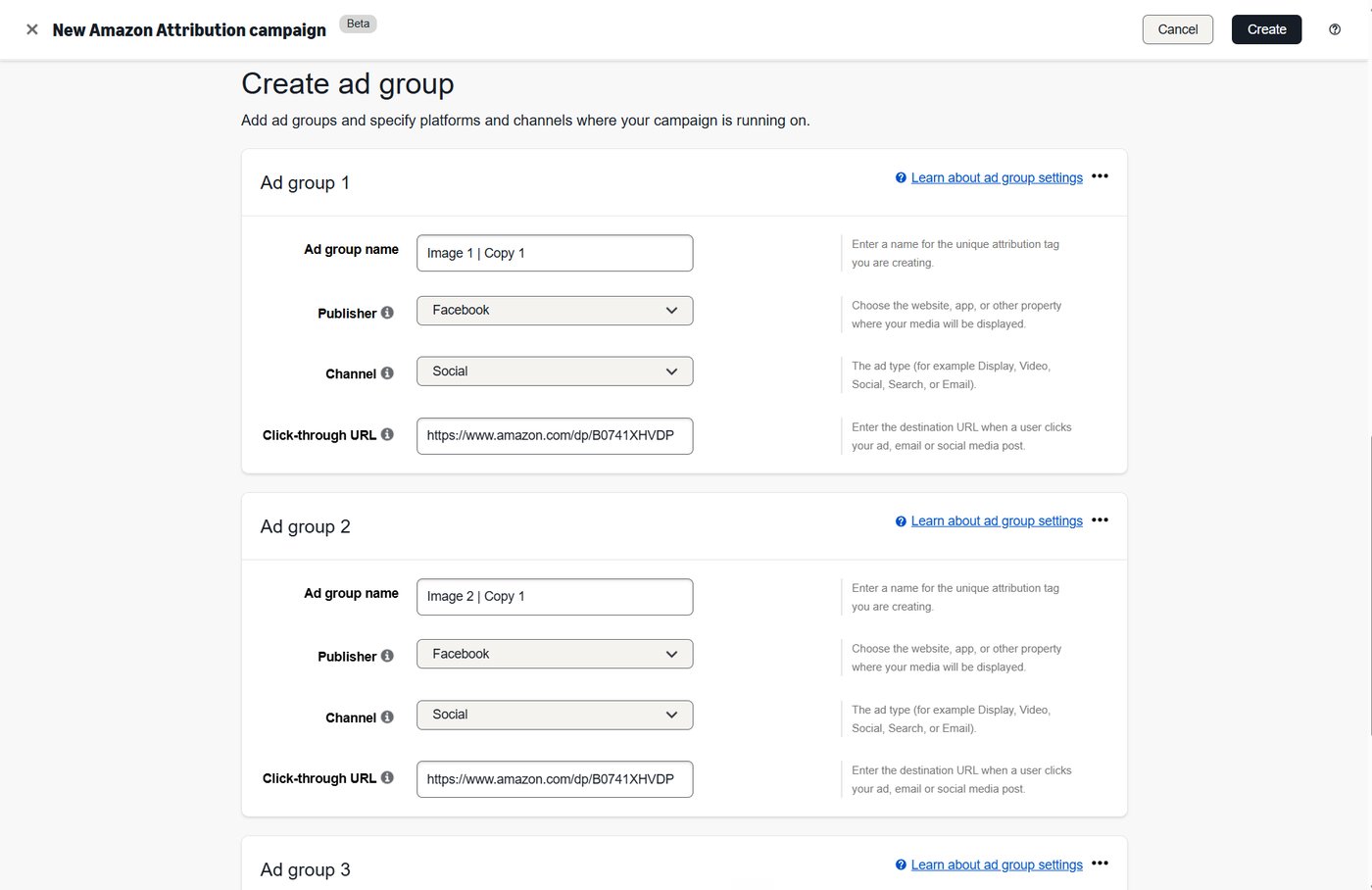
For your first ad group, fill in three things:
- Ad group name. Use your naming system.
image 1 copy 1 - Publisher. Select Facebook.
- Click-through URL. Paste your clean link.
Then you need one of these for each image you are testing.
There is a Duplicate option on each ad group, under the three dots menu. Use it, but know what it does. Amazon being Amazon, it only copies the publisher and the channel. It does not copy the name or the URL. So you still have to paste the link and type the name each time. It saves you two clicks, not twenty.
Duplicate until you have one ad group per image, then fill in each one:
image 1 copy 1 | Facebook | https://www.amazon.com/dp/YOURASIN image 2 copy 1 | Facebook | https://www.amazon.com/dp/YOURASIN image 3 copy 1 | Facebook | https://www.amazon.com/dp/YOURASINEvery ad group points at the same URL. That is correct and it is not a mistake. The only thing that differs is the name. Amazon generates a different tracking code for each one, and the tracking code is what separates them.
Check everything once, then hit Create in the top right.
It usually takes ten to twenty seconds. Sometimes it goes through instantly.
Step 5: The out of order trap
This is the one that gets people, so read it twice.
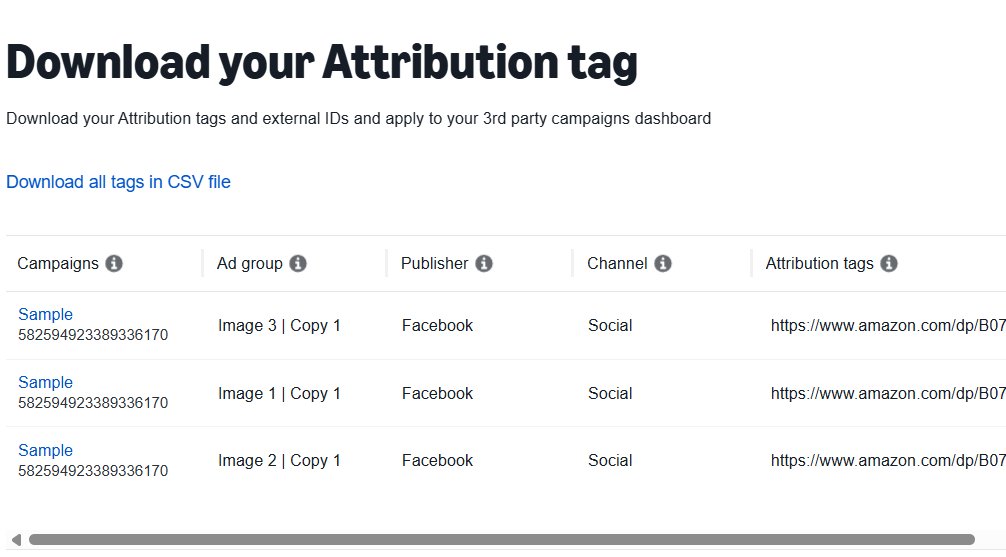
When your campaign is created, Amazon shows you the list of ad groups with their tracking links. They will very often not be in the order you entered them.
I have watched it come back as image 2, image 4, image 1, image 3. There is no logic to it and there is no setting to force it. I have looked.
What happens next is predictable. You assume the top one is image 1, because you entered image 1 first. You copy them down in order. Now image 1's link is on image 3's ad, and every number you look at for the next month is wrong.
I have done this myself. I have watched people I have coached do it. The data comes out dirty, meaning it is not just slightly off, it is unusable, and you have to tear the whole thing down and start again.
So: read the ad group name on every single row before you copy its link. Every time. Do not go by position.
While you are here, right-click one of the tracking links and select "go to". Confirm it lands on your book. It takes five seconds and it catches a bad paste before it costs you anything.
Step 6: Get the links into Facebook
Head to Facebook Ads Manager at adsmanager.facebook.com.
If you are running ads somewhere that does not look like Ads Manager, through the boosted post button or the app, you are in the wrong place. Ads Manager is where you get real control and real results.
I am assuming you already have your campaign and ad set built. If you do not, that is a bigger topic and I have written it up separately in the complete Facebook ads guide for sci-fi and fantasy novels. Come back here once your ad set is ready.
Name your first ad to match
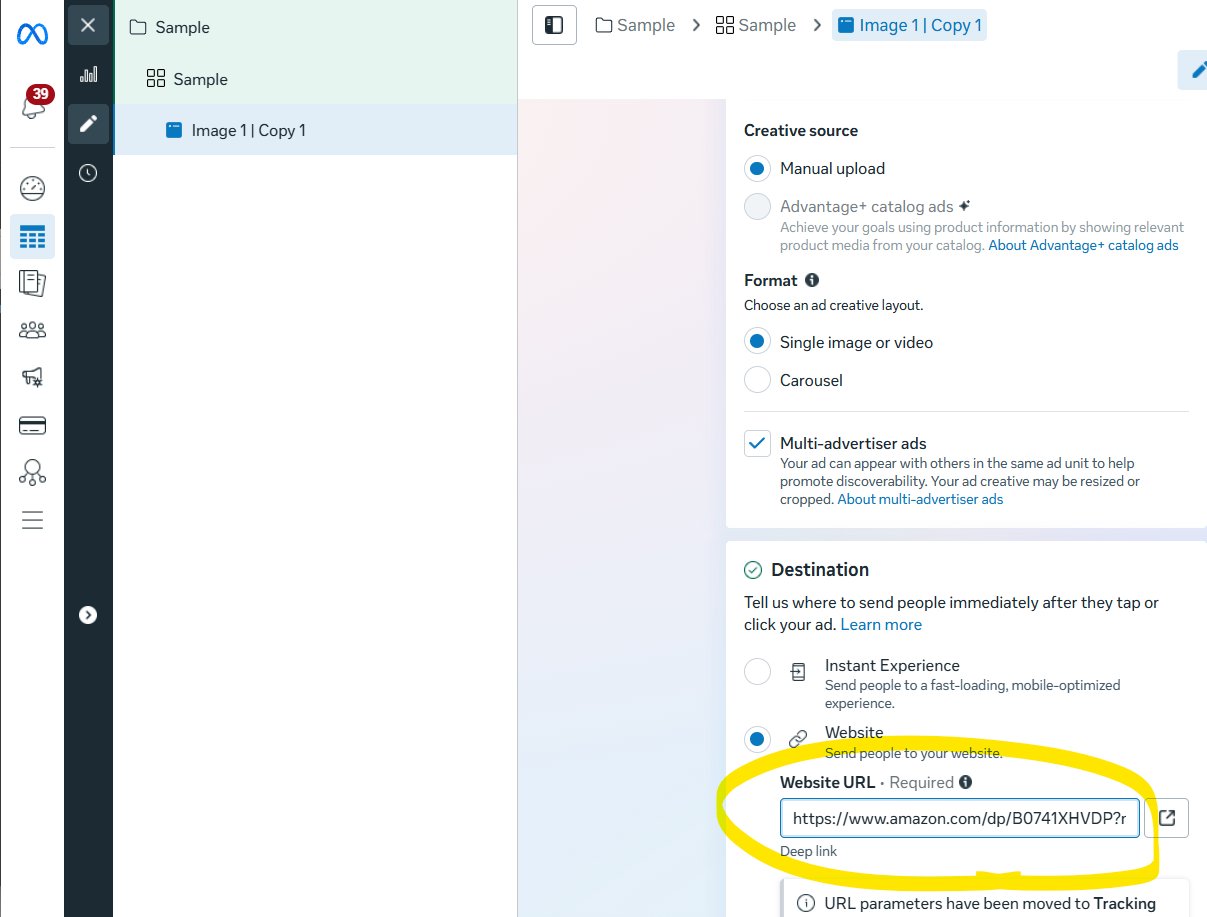
Open your first ad and rename it image 1 copy 1. Exactly as it appears in Amazon Attribution.
Facebook has a type-ahead on the name field, so once you have done this a few times it fills itself in.
Paste the link
Scroll to the Website URL field. Delete whatever is in there and paste the tracking link from the Amazon ad group with the matching name.
The display link underneath should show amazon.com.
Duplicate for each image
Duplicate the ad. Change the name to image 2 copy 1. Swap the image. Paste the matching link.
Repeat for every image.
One thing I do not recommend: putting several images into a single ad as a carousel. After working with hundreds of authors on this, it muddies exactly the thing you are trying to measure. One image, one ad, one link. Keep it clean.
Step 7: Check the last four characters before you publish
Do not skip this.
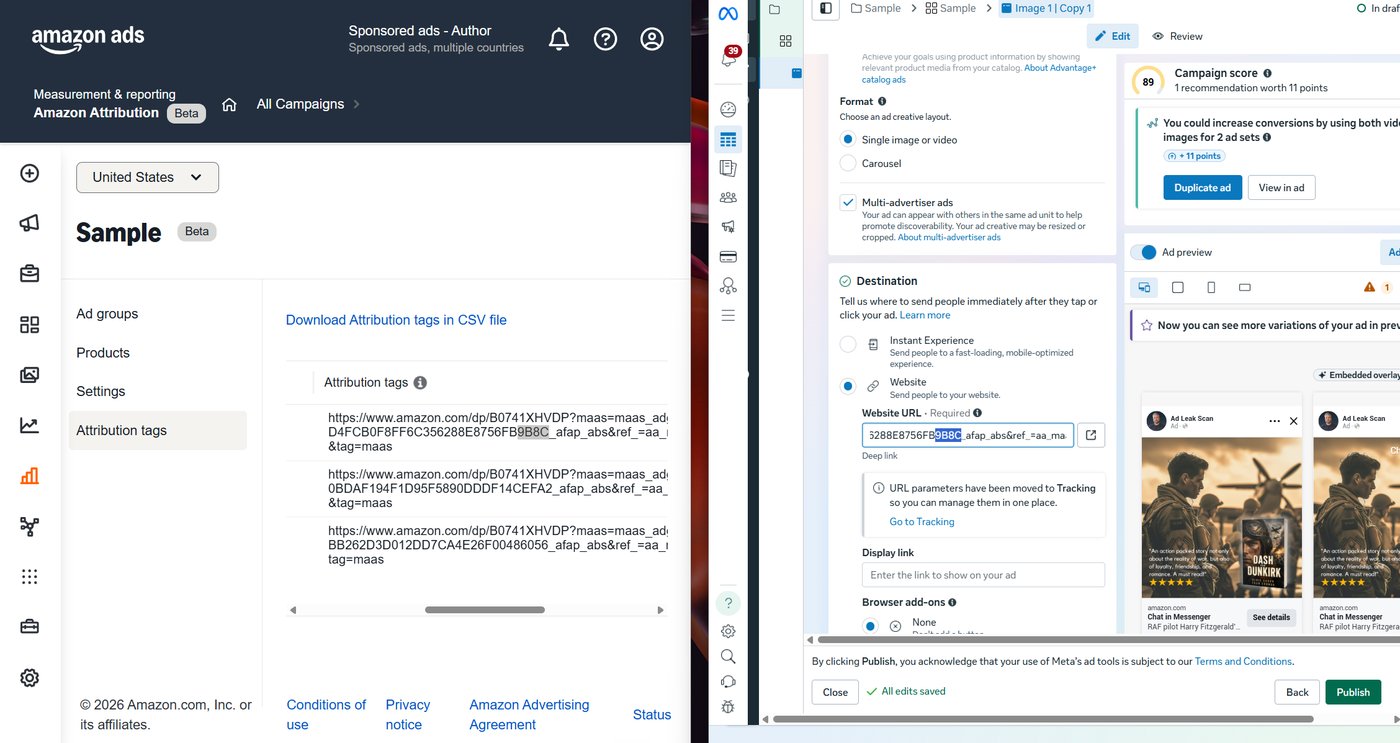
Those tracking links are long and ugly and they all look the same at a glance. The only part that differs is the tail end.
So before you publish, take the last four characters of the link in each Facebook ad and match them against the Amazon ad group they came from.
In one of my accounts it looked like this. Image 1's tag ended 4DE8. Image 2's ended 8B86. I checked image 1's ad, saw 4DE8, checked image 2's ad, saw 8B86, and only then published.
Four characters. Two seconds each. It catches the mistake that costs you a month.
I do this on every ad account I touch, including my own, because I have made this exact mistake before. Once I used the same link on two different images. Two ads, one tracking code, no way to separate them. The only fix was to rebuild it.
Publishing
Before you hit publish, run a last check over the whole thing. Objective set to traffic. Ad set name and daily budget as intended. Targeting as intended, and remember you have to click Edit to see all the targeting options, they are not all shown by default. Placements set the way you want them. Primary text and headline actually filled in.
On the end date field: leave it blank. You only set an end date if you are going away and want the ads to stop while you cannot watch them.
Then publish each ad individually. Green publish button, next ad, check it, green publish button, and so on.
Once published, the status should read Processing, then In Review. If it says Draft or shows a setup error, something did not save.
You will usually hear back within twelve to twenty four hours. In my experience around ninety nine percent get approved, assuming your images and copy are not doing anything controversial.
An aside: shortening the link for your primary text
Optional, and honestly, mostly not worth it. Including it because people ask.
If you want to put the link in the ad's primary text as well as the button, pasting the raw tracking link looks terrible. It reads as spam.
You can clean it up free with Bitly. Sign up at bitly.com, create a new link, paste the tracking link as the destination, give it a title, and create. Change the domain to amzn.to rather than the default Bitly one, because amzn.to signals to readers that they are going to Amazon.
Three things that will trip you up:
- After typing the title, click out of the field before hitting create. If you do not, it does not save the title.
- Use Bitly's copy button. Selecting the text manually and copying it does not reliably work.
- Make sure the link you paste starts with
https://. Without it, it will not be clickable.
Now the honest part. This is of limited use. Nobody is going to manually type an Amazon link out of an ad. And on Instagram, a link in the primary text will display but readers cannot click it, so it does nothing at all there. On Facebook it is clickable and can be mildly useful. That is about the extent of it.
The link on your button is what matters. That is the one doing the tracking work.
When the data shows up, and where to find it
Attribution runs about one to two days behind. It is not live.
This matters when you go to judge your ads. If you pull Facebook's spend numbers for today and Amazon's sales numbers for today, you are comparing complete spend against incomplete sales, and every ad will look worse than it is. So when you review, look at a window that ends a day or two ago and let Amazon catch up.
To see your numbers: Measurement and Reporting, Amazon Attribution, then click into your campaign.
Two things to set:
Date range. Default is usually too narrow. I use Lifetime.
Columns. The default view leaves out most of what you need. Click Columns, then Customize columns, and switch on:
- Click-throughs
- Purchases
- Units sold
- KENP read (Kindle Edition Normalized Pages, which is Amazon's standardised page count for Kindle+)
- Estimated KENP royalties
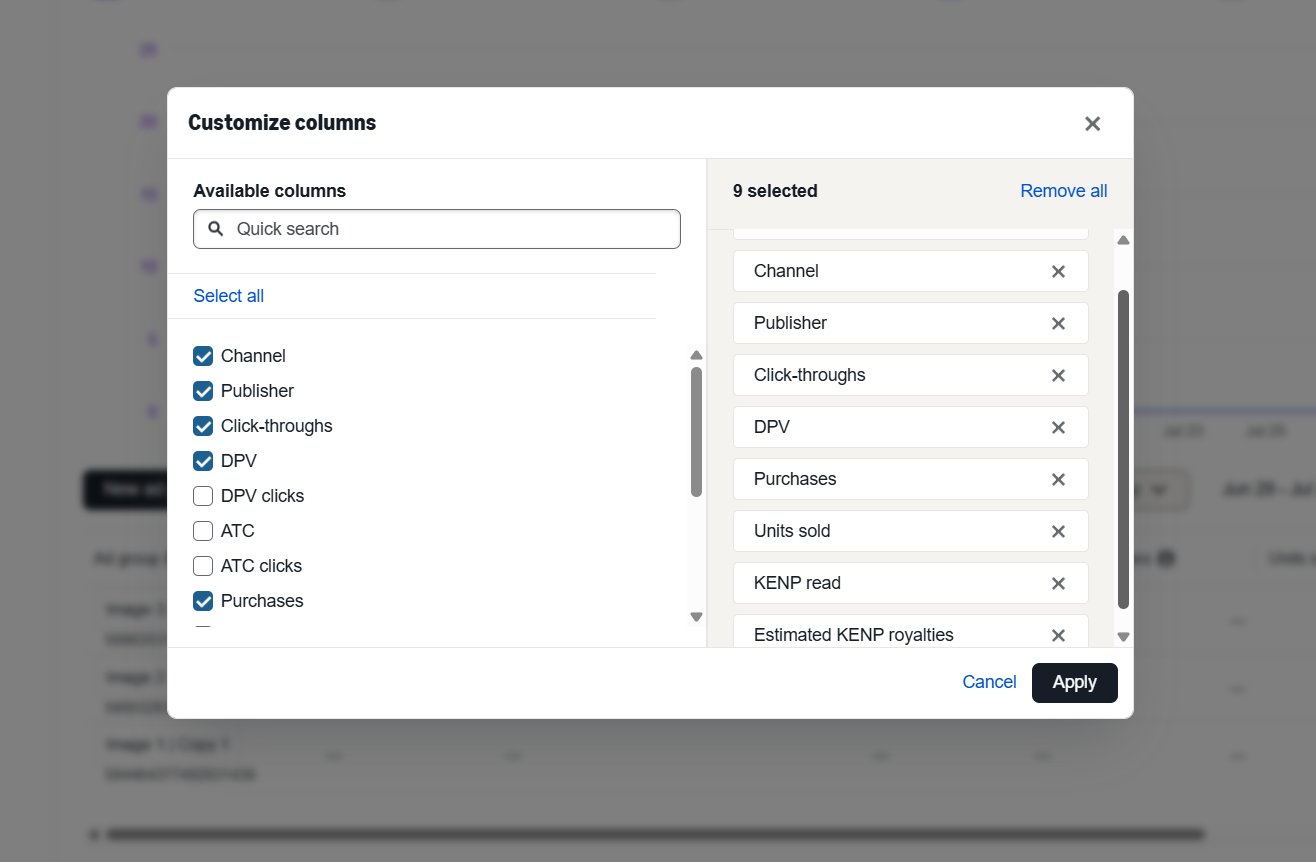
Then sort by ad group name, because the display order will be scrambled here too.
Be patient with it
Two forms of patience are required.
Page reads take weeks. If your book is in Kindle+, page reads do not arrive in a lump. Fantasy and science fiction novels routinely run past 100,000 words. Readers take two, three, four weeks to finish one. So the page reads from an ad you ran in March will still be arriving in April.
Clicks take time too. The most common mistake I see is calling an ad dead far too early. Somebody has thirty clicks and no sales and wants to switch it off.
Thirty clicks tells you nothing. Ten clicks tells you nothing. I give every ad 120 clicks before I judge it, or 200 if the budget is $30 a day or more.
Past 120 clicks with no sales, now you have real information, and the information is usually not about the ad. It is about what happens after the click. Cover, blurb, reviews, price, or targeting that is bringing the wrong readers. Turn the ad off, but go and look at those things rather than just building another ad.
What Attribution does not do
Being straight with you about the gaps, because knowing them saves you from misreading your own numbers.
Fourteen day window. Amazon uses a fourteen day last-touch model. A purchase only gets credited to your ad if it happens within fourteen days of the click. Someone who clicks, sits on it for three weeks, then buys will not show up. In fiction, where people genuinely do sit on a purchase, some real sales fall outside that window and you will never see them.
One to two day lag. Covered above. Nothing is live.
No audiobook tracking. Audible and audiobook sales do not come through Attribution. If audio is a meaningful part of your revenue, this reporting is not seeing it.
Permanently in beta. It has carried the beta label for years. In practice it works, but Amazon changes things without announcing them, so if a screen looks different from what I have described, that is why.
One country at a time. As covered, the UK, Canada and Germany each need their own setup in their own ads console.
None of this makes Attribution not worth doing. Partial visibility beats the alternative, which is none. Just do not treat the numbers as a complete count of every sale your ads produced. They are a reliable way to compare your images against each other, which is what you actually need them for.
Troubleshooting
The ad groups came back in a different order than I entered them
Expected behaviour. There is no fix and no setting. Read the ad group name on every row before copying its link, every single time.
I think I used the same link on two different ads
Check the last four characters of the website URL on each ad. If two match, your data for both is compromised and cannot be separated after the fact. Create a fresh ad group in Amazon Attribution for the affected image, paste the new link into that ad, and treat the earlier numbers as unusable.
No data is showing up after several days
Work through these in order. First, remember the one to two day lag, so anything from the last forty eight hours is not there yet. Second, check your date range, since the default window is often too narrow and Lifetime will show you everything. Third, check your columns, because purchases and KENP read are not shown by default and the data can be sitting there invisible. Fourth, confirm the ads actually went live rather than sitting in review. If all four check out and you still have nothing after a week of real clicks, the link on the ad is probably wrong. Click the ad's link yourself and confirm it lands on your book.
The shortened link is not clickable when I paste it in
It is missing the https:// at the front. Use Bitly's copy button rather than selecting the text by hand.
Facebook is throwing an error about the image and placements
Your image is too heavily landscape for the vertical placements. Use 1080 by 1080 and it goes away.
The ad went to Draft or shows a setup error instead of Processing
Something did not save. Reopen the ad and check the website URL field specifically, since it is the one most likely to have been cleared.
This works for more than Facebook
Everything above applies to any platform that sends clicks to Amazon. Instagram ads, BookBub ads, newsletter ads, your own newsletter.
The only change is the Publisher field on the ad group, and I would give each platform its own campaign so the results stay separated.
For what it is worth, across the ad accounts I have looked at, Facebook consistently delivers the best combination of click cost and conversion for fiction. But if you are running elsewhere, or want to test it, these links are how you find out rather than guess.
What to do with the numbers
You now have clicks, purchases and page reads split out by image. That is one half of the picture.
The other half is cost. What you paid per click, and what a reader is actually worth to you once they are in your books. Conversion rate on its own can mislead you: an image can convert beautifully and still lose money if the clicks are expensive enough, and an image can convert modestly and be your best performer because the clicks are cheap.
The two numbers that resolve this are cost per new reader and value per new reader. I have written that up in full here: cost per new reader vs value per new reader. Attribution is what makes that calculation possible in the first place, because without it you have no purchase data to work from.
That is also the reason I built KdpDeck. It puts Facebook ad spend, Amazon ads and KDP royalties on one screen and works out those two numbers for you. It expects you to have Attribution running, which is why this guide exists.
Set the links up today. It is twenty minutes and it is the difference between running ads and knowing whether they work.
Frequently asked questions
Is Amazon Attribution free?
Yes. Amazon Attribution costs nothing to use and there is no minimum spend. It is a measurement tool, not an advertising product. You are not buying ads from Amazon when you use it. Every KDP author with a published book can access it through the Amazon Ads console.
Do I need to be running Amazon ads to use Amazon Attribution?
No. You need a published book and nothing else. You do not need an active Amazon ads campaign, you do not need to have ever run one, and you do not need to spend anything with Amazon. Attribution sits in the Amazon Ads console under Measurement and Reporting, but it works independently of the ads themselves.
Does Amazon Attribution work with Kindle+ (Kindle Unlimited)?
Yes, and this is one of the better reasons to use it. Attribution reports KENP read, which is Kindle Edition Normalized Pages, Amazon's standardised page count for Kindle+ borrows. It also reports estimated KENP royalties. You have to switch both columns on manually under Customize columns, because they are not shown by default.
Expect page reads to arrive slowly. Fantasy and science fiction novels regularly run past 100,000 words, so readers take two to four weeks to finish one. Page reads from an ad you ran last month will still be trickling in this month.
How long does Amazon Attribution take to update?
Roughly one to two days. It is not live reporting.
This matters when you judge your ads. If you compare today's Facebook spend against today's Amazon sales, you are putting complete spend next to incomplete sales, and every ad will look worse than it is. Review a window that ends a day or two ago and let Amazon catch up.
What is the Amazon Attribution window?
Fourteen days, on a last-touch model. A purchase is credited to your ad only if it happens within fourteen days of the click, and the credit goes to the most recent link clicked before the purchase.
For fiction that means some genuine sales go uncounted. Readers who click, sit on it for three weeks, then buy will not appear in your numbers. Attribution is reliable for comparing your images against each other. It is not a complete count of every sale your ads produced.
Why is Amazon Attribution not showing any data?
Work through four things in order.
First, the one to two day lag, so anything from the last forty eight hours will not be there yet. Second, your date range, since the default window is often too narrow and Lifetime shows you everything. Third, your columns, because purchases and KENP read are off by default and your data can be sitting there invisible. Fourth, whether the ads actually went live rather than sitting in review.
If all four check out and you still have nothing after a week of real clicks, the link on the ad is probably wrong. Click it yourself and confirm it lands on your book.
How many Attribution links do I need?
One per image you are testing. Each Attribution ad group produces exactly one tracking link, and each link goes into one Facebook ad. Three images means three ad groups means three links.
If you run the same images against a second targeting approach, or on a second platform, those get their own campaign and their own set of links so the results stay separated.
Can I use Amazon Attribution links outside of Facebook?
Yes. They work anywhere you can put a clickable link that sends people to Amazon. Instagram ads, BookBub ads, newsletter ads, your own newsletter, your website.
The only change is the Publisher field when you create the ad group. I would give each platform its own campaign so you can tell the results apart.
Does Amazon Attribution track audiobook sales?
No. Audible and audiobook sales do not come through Attribution. If audio is a meaningful part of your income, this reporting is not seeing it.
Does Amazon Attribution work outside the US?
Yes, but not automatically. If you are advertising into the UK, Canada or Germany, you have to go to that country's Amazon ads console and create the links separately there. It is a pain. Most of us see the majority of sales through the US, so start there and only build out the others if you are genuinely spending money into them.
Get In Touch
Stuck on the
setup, or on
the numbers?
Tell me about your books: genre, how many titles, and where you're at with ads. If it's a quick Attribution question, ask it. If you'd rather someone read the whole picture for you, that's what I do.
I usually reply within one business day.
Or email directly
[email protected]